Summary

The HIPAA Security Rule released in 2003 is under major review. A recent report from the HHS Office of Inspector General found big gaps in the oversight and audit processes used to evaluate the Rule. Meanwhile, cyberattacks continue to cause havoc in the industry. About twenty updates are under review that address the risk and technical safeguards for ePHI. Experts predict providers will face $33 billion over five years to upgrade their technologies and processes. What are the four cost-effective steps with legacy data management to take now?

Note: The Trump administration’s Regulatory Freeze issued on Jan. 20 calls into question the status of this rule. The freeze stops new rules for 60 days. The new rule currently is in its comment period until March 7, 2025.


Join Fellow Healthcare IT Pros

Tips, Guides, News & More

Sign Me Up

Cyberattacks on healthcare providers continue to plague the industry. Over the past two years, 45 percent of healthcare organizations have experienced a data breach and there is not an end in sight.

Healthcare organizations are improving their defenses, but challenges remain. The Ransomware Task Force (RTF), a collaborative of security experts from government and industry, recently reported: The majority of organizations globally are still underprepared to defend against or recover from a ransomware attack.

Meanwhile, the U.S. Department of Health and Human Services (HHS) closed out 2024 by issuing a Notice of Proposed Rulemaking (NPRM) to modify the Health Insurance Portability and Accountability (HIPAA) Security Rule. The aim is to increase cybersecurity protections for electronic protected health information (ePHI).

The focus on updating the rule follows a recent report from the HHS Office of Inspector General. The report examined the enforcement of the HIPAA Privacy Rule by the Office for Civil Rights (OCR). In the report, the OIG noted that the HIPAA audit was too narrowly focused to effectively assess ePHI protections. The report called out that the audit only assessed 8 of 180 HIPAA Rules and only two were related to the Security Rule, with nothing related to physical and technical safety.

The OIG report noted that (current) OCR oversight of its HIPAA audit program was not effective at improving cybersecurity protections at covered entities or business associates.

There are about twenty updates proposed in the new HIPAA Security Rule including:

  • Specific Risk Analysis – New requirements would include a written assessment that contains:
    • An up-to-date technology asset inventory and a network map. This would require tracking the flow of ePHI across all systems and require annual updates or updates when significant changes to the organization’s operations or environment occur.
    • Identification of all reasonably anticipated threats to confidentiality, integrity, and availability of ePHI
    • A list of possible vulnerabilities and predisposing conditions to the regulated entity’s relevant electronic information systems.
    • An assessment of the risk level for each identified threat and vulnerability, based on the likelihood that each threat will exploit the identified vulnerabilities.
  • More Technical Safeguards – A select list of the suggested technical updates is below.
    • Encryption of ePHI at rest and in transit.
    • Multi-factor authentication, advanced encryption protocols and mandatory vulnerability scanning every six months.
    • Network segmentation separates mission critical assets into discrete network segments to minimize lateral movement by threat actors after initial compromise.
    • Separate technical controls for backing up and recovering ePHI to ensure data integrity and availability.
    • A compliance audit at least annually to ensure compliance with the Security Rule requirements.

The complete NPRM can be viewed or downloaded here.

What do the newly proposed HIPAA rules mean for healthcare providers?

These new requirements come with a hefty costs for provider organizations to update technologies and processes. However, the cost of not acting is not only high, but also endangers critical infrastructure, patient safety and opens the door for other harmful consequences.

This means it is more important than ever to think through an enterprise data management strategy and to consolidate the IT footprint as much as possible to reduce risk, remove unnecessary costs and to be prepared for the future.

One step that organizations can take immediately is to know what technology assets they have in use.

The OCR proposes to require regulated entities to conduct and maintain an accurate and thorough written technology asset inventory and a network map of its electronic information systems and all technology assets that may affect the confidentiality, integrity or availability (CIA) of ePHI.

The Technology Asset Inventory requirements in the proposed HIPAA rule includes six areas:

  1. All physical devices and systems including servers, computers, mobile devices, and medical devices.
  2. Software. All applications and software programs used to process, store and transmit ePHI. Includes operating systems, databases, and other relevant structures.
  3. Network components. All devices and components such as routers, switches, firewalls, and other infrastructure that supports the network.
  4. Data storage locations. All locations where ePHI is stored. Includes on-prem data centers, cloud storage and backup systems.
  5. Endpoints. All endpoints that access the network, such as workstations, laptops and other devices that are connected to the organization’s applications.
  6. Security measures. Details of the security measures in place to protect each asset, such as encryption, access controls and anti-malware software.

How can legacy data management support healthcare providers in meeting the new HIPAA Rule?

It’s a well-known fact that legacy systems are a leading risk factor for security incidents. We’ve outlined the six major security risks lurking in legacy systems.

The best protection against the risks from keeping legacy systems up and running is to:

  1. Utilize this tool we developed to create an inventory of legacy systems to support decision making and guide the legacy data management plans.
  2. Create (or update) the organization’s legacy data management strategy.
  3. Consolidate legacy data into an active archive like HealthData Archiver® which helps the organization meet regulatory requirements that can include record retention of up to 30 years or more.
  4. Decommission legacy EHR and ERP systems to remove risk factors and realize security, cost and other benefits.

Adopting strong legacy data management practices helps organizations be prepared for the expanded HIPAA Security Rule and other regulatory updates like the Health Data, Technology and Interoperability (HTI-2) proposed rule from the Dept. of Health and Human Services through the Office of the National Coordinator for Health Information Technology. The Harmony Healthcare IT team continues to innovate and update its solutions with features to support expanding needs such as clinical image exchange, multi-factor authentication and more.

Are you looking for a legacy data management partner that is focused on the future?

Reach out to our trusted team at Harmony Healthcare IT.

Additional references:

The proposed rule, press release and fact sheet. Comments are due by March 7, 2025. The current regulatory text for review is here.

Healthcare IT tips, guides, news & more delivered to your inbox

Learn More

Summary

New partnership streamlines access to advanced data archiving and migration solutions for OCHIN’s national member network

Join Fellow Healthcare IT Pros

Tips, Guides, News & More

Sign Me Up

Harmony Healthcare IT, an innovator of health data management and platform solutions, today announced a preferred technology partnership with OCHIN, a national non-profit health IT organization that provides health care solutions to community health centers, rural hospitals, and other community health care organizations.

The partnership enables OCHIN members to seamlessly access Harmony Healthcare IT’s industry-leading data archiving and migration solutions through OCHIN’s integrated contracting process, enhancing operational efficiencies while reducing administrative and technical burdens of acquiring and implementing new technologies

With the addition of Harmony Healthcare IT as a preferred technology partner, OCHIN members can now reduce costs associated with legacy data solutions, strengthen data security and compliance and improve efficiency in accessing and managing historical health data.

By leveraging Harmony Healthcare IT’s expertise, OCHIN members will be better equipped to focus on delivering high-quality, culturally competent care to patients across the different communities they serve.

“OCHIN is an organization that shares our vision for improving care delivery through meaningful partnerships,” said Tom Liddell, CEO of Harmony Healthcare IT. “By collaborating with OCHIN, we are ensuring that its national network of community health organizations have access to interoperable health data solutions. These tools empower providers to better serve patients, enhance care delivery, and improve operational efficiencies, particularly in rural and underserved communities where access to care is critical.”

OCHIN supports more than 2,000 healthcare delivery sites across 40 states, serving 34,500 active providers and currently has partnerships with over 50 preferred technology providers.

For OCHIN members interested in leveraging Harmony Healthcare IT’s solutions, the preferred partner contracting process ensures a seamless acquisition experience, making it easier than ever to adopt innovative technologies.

Healthcare IT tips, guides, news & more delivered to your inbox

Learn More

Summary

Data privacy is a key component of the Health Insurance Portability and Accountability Act (HIPAA) law which originated in 1996. As more electronic transactions were conducted, a separate HIPAA Privacy Rule became official in 2003. This legislation outlines approved uses, disclosures and grants patients rights over their protected health information (PHI). In the last 20+ years, the HIPAA rules have expanded to further improve healthcare data security and increase patient privacy rights. Recently, the American Patients’ Rights Act (APRA) introduced more patient privacy protections that could enhance the security measures healthcare providers must implement to protect patient data. To be ready, healthcare providers need to be agile and equipped to fully utilize digital technology solutions for patient care and remain compliant with expanding federal and state regulations.

Join Fellow Healthcare IT Pros

Tips, Guides, News & More

Sign Me Up
Learn eight steps for data privacy from Harmony Healthcare IT

The trust between a patient and their care team largely rests on the privacy of their protected health information. This is the basis of data privacy which refers to the protection of sensitive personal health information contained in a patient’s medical record.

More than 92 percent of patients believe privacy is a right and their health data should not be available for purchase, according to an American Medical Society (AMA) survey. With 75 percent of patients in that same survey reporting they are worried about the privacy of their health data, what are the best practices health care organizations should take to comply with regulatory laws and maintain trust with patients?

What is health data privacy?

Health data privacy is the responsibility to protect the sensitive information contained in medical records. This includes the individual’s past, present or future physical or mental health or condition, the provision of health care to the individual or the past, present or future payment for the provision of healthcare for the individual.

The HIPAA Privacy Rule established in 2003 includes national standards to protect individuals’ medical records and other individually identifiable health information. It applies to health plans, health care clearing houses and certain health care providers that conduct transactions electronically.

The primary purpose of the Privacy Rule is to define and limit the circumstances in which an individual’s PHI may be used or disclosed by covered entities.

Why is health data privacy important?

Protecting medical history, treatment and insurance data is paramount to the trust needed between patients and healthcare providers. Trust is vital so that patients will share accurate and comprehensive information with their doctors while knowing that their data is confidential. Healthcare professionals rely on this secure and accurate health information to make the most informed treatment decisions, coordinate care and improve patient outcomes. The integrity of the medical record is paramount to the overall state of health care.

What is the difference between data privacy and data security?

There is an intersection of data privacy, security and healthcare technology. It is common for data security and data privacy to be discussed in tandem; however, there are key differences between them.

Data security focuses on protecting data from any unauthorized third-party access, breaches or other threats. It involves implementing policies, and technical, administrative and physical safeguards to keep data safe from external, and sometimes internal, threats.

Data privacy focuses on who can access and use personal health information. Sometimes called information privacy, it involves policies and practices that govern how health information is collected, used and shared. The HIPAA Privacy Rule regulates the use and disclosure of Protected Health Information (PHI) by covered entities and gives patients the right to access their own medical records while restricting unauthorized access. Privacy rules are also important to ensure that data deletion and destruction policies are followed.

Bottom line: Data security protects PHI from unauthorized users, while data privacy makes sure that data is collected, used and shared appropriately.

What steps should a health care organization take to ensure data privacy?

  1. Organization-wide approach. Develop a security and privacy culture. Make sure everyone in the organization is aware of the importance and expectations regarding data privacy.
  2. Executive buy in. Involve the Governance Board in the privacy policy review. Include broad representation, such as: Chief Operations Officer, Human Resources, Clinical, Finance, Marketing, Legal, Chief Data Officer, etc.
  3. Understand and evaluate risk. There are several frameworks to use to evaluate risk. The NIST Privacy Framework is one.
  4. Develop a Risk Registry. This document can be as simple as an excel spreadsheet to identify potential risks within the organization. It also serves as an ongoing log to track and manage risks and mitigation plans. Use the registry weekly and communicate the information to the executive team.
  5. Establish organizational privacy policies. Outline what the organization is doing to protect sensitive information. Include what the organization/staff should and should not do. To enhance policies in a mature organization, continue to review applicable laws (HIPAA, state, international if applicable) and share information with legal counsel to draft and/or update the policy documents.
  6. Review privacy resources. There are several free online resources to utilize when developing and updating the organization’s privacy policies. A few include: gov, CISA checklist. The AMA has a guide of Privacy Principles for a national privacy framework based on individual rights, equity, entity responsibility, applicability and enforcement. Further there is an AMA guide for app developers and app privacy attestations collected by EHRs.
  7. Consider third party attestation. HITRUST is a globally accepted standard for security and privacy.
  8. Plan for training. Develop an organizational plan for training to make sure everyone knows the expectations for proper data handling. Look at role-based training – especially for those who are handling protected health data. To streamline the time involved in setting up the training, consider using a learning management tool to support your training exercises.

What are the best practices for data privacy?

  • Organizational awareness. Make sure everyone in the organization is clear on the importance and policies of the privacy programs. Conduct initial and follow up with annual training.
  • Limit access. Review those with high level credentials for data access on an ongoing basis.
  • Inventory. Create and review a list of physical assets, data assets and who needs access to those assets. Keep an updated inventory of all systems and applications that includes cloud based and on-prem. Interview the leaders of the business (about which applications they are using, where the data is stored, who manages it, etc.) and update it annually.
  • Lifecycle management. Look at log files, end of support for software, legacy applications, and be ready to modernize or move data. Look at vendors for turnaround time for support.
  • Retention schedule. Keep track of applicable laws for all the different types of records that are used by the organization and how long the data must be retained. Tie it back to the data inventory. For example, emails may be kept for two years, and then work with IT to process through the destruction policy.
  • Assess risk of third-party vendors. Continue to check in annually to confirm the vendor’s risk posture. Contractually require that third party vendors comply with the organization’s privacy policy and then audit annually to confirm.

How does archiving support data privacy?

With the average hospital using 10 EHRs and health systems keeping 18 different EHRs up and running, there is a large data footprint to keep in compliance for privacy and security.

As EHRs are replaced, the legacy data needs to be retained to meet regulatory compliance and future needs. A smart solution involves an active archive like HealthData Archiver®. Archiving data centralizes legacy data into one location which eases the burden of implementing and monitoring privacy controls and auditing. Further privacy related benefits include the ability to perform data management checks such as audit logs, break the glass functionality, role-based access and purge functionality.

How does Harmony Healthcare IT support data privacy?

Leading healthcare providers of all sizes trust our team to consult on and deliver legacy data management solutions that support interoperability, security, and privacy requirements.

Further, our Secure Record Delivery functionality allows legacy data stored within HealthData Archiver® to be available to an EHR or patient portal endpoint. And, our Record Release Service allows customers the option to outsource their release of information process to an experienced, secure agent who can facilitate information release to patients, payers, lawyers or employees.

For more information about our take on data security and privacy, check out our webinar: Data Privacy & Security Best Practices for Hospitals & Clinics

We look forward to hearing how we can support your lifecycle data management effort.

We’re here for you.

Healthcare IT tips, guides, news & more delivered to your inbox

Learn More

Summary

Legacy clinical, financial and administrative software applications nationwide comprise 20 percent of the technology assets in hospitals and health systems. The story is remarkably similar as over time, newer more robust applications are added with legacy applications left in a variety of read-only modes. At first, keeping legacy systems running may not create issues, but before long challenges arise and action is needed. A solid move forward is to migrate the legacy data to an active archive and decommission the legacy system. In this blog, we outline the step-by-step process for a successful legacy data migration.

Join Fellow Healthcare IT Pros

Tips, Guides, News & More

Sign Me Up
Steps for Completing a Data Migration from Legacy Systems

With interoperability as a top priority for healthcare organizations of all sizes, there is a focus on choosing the data management solutions that can get the job done. To accomplish the demands of seamless integration and sharing of health data inside and outside the organization it is necessary to take a hard look at the applications in operation. Then, determine which legacy systems are not in line with current and future priorities. Our recent blog about legacy systems includes a checklist of six reasons when it is time to modernize your legacy systems.

When Should You Perform a Legacy System/Database Migration?

The best time to migrate data from a legacy application to the active archive is before its too late. This means before there is a technical failure, cybersecurity incident, lack of system knowledge on the internal team and before the IT landscape is a complicated spider web of hundreds of applications.

Each migration journey to archiving is unique. Sometimes it even involves archiving a current archive for a single point of truth. Check out this video about one regional IDN’s perspective on data migration to shore up more than 300+ legacy systems and migrate an existing archive to better meet the organization’s long-term goals.

Why Legacy System/Database Migrations are Important?

The data migration to archive process is ideal to support decommissioning of healthcare applications. Migrating the clinical, financial, and operational data that must be saved to meet retention requirements to an archive keeps data secure and accessible. This means clinicians can continue to access the data through Single Sign-On in the go-forward EHR. It also allows direct log in to HealthData Archiver® for other users and administrators for optimized legacy data consolidation, searchability and workflows.

Challenges and Benefits of a Legacy System/Database Migration

Moving data comes with obstacles. It is not as easy as extracting files from one system and loading them into the go-forward EHR or archive. Some of the most familiar challenges in a migration project is data compatibility as there are numerous differences in how records are organized. This includes the naming conventions for medications, allergies and even how patient demographics are charted. These potential roadblocks need additional preparation to ensure the data is migrated correctly.

Other common challenges we have encountered include low quality of legacy data, lack of management commitment, lack of internal expertise with the outgoing application, and compliance issues with hardware, software, and licenses.

That said, there are important benefits to realize with a successful legacy system migration. At the top of the list is a streamlined application portfolio and improved interoperability. Next is cost savings, improved data compliance, increased security, and less technical risks.

The Nine Steps for Successful Legacy System/Database Migration

It is important to realize the differences between healthcare data conversion and data migration. Migration involves the act of moving information from one system to another while conversion adds the additional step to transform the information from one format to another. Check out our conversion services information for more detailed information on that service.

Our migration process can move legacy data to its new “home” in a go-forward EHR or to the active archive HealthData Archiver®.

Looking at migration, Scott Engelman, director of IT revenue cycle application for Main Line Health shares several crucial factors to streamlining the EHR data migration process.

Once there is a decision to move forward, there are steps for migration that include:

  1. Determine Project Scope. Determine the data that needs to be moved (migrated), the length of time to go back and if there is data that is not needed that can be purged.
  2. Create Data Migration Strategy. This is your roadmap and should define milestones, timelines, resources needed, and if the migration will be a full or phased project.
  3. Organize a Team. This includes internal and external resources. An Executive Sponsor is key to gaining organizational support, a Project Manager will lead the initiative and Subject Matter Experts will provide vital input. External support includes choosing an experienced vendor, so the migration process goes well.
  4. Commit to Stakeholder Communication. Plan for the ongoing sharing of information. Consider options within the organization to receive feedback or answer specific questions.
  5. Data Prep. This step takes time but is critical to project success. It is important to look at how the current data is stored in the source system and how it is going to align with the specifications of the new system or archive. This will inform field level mapping. This also involves looking at three data governance considerations: data filtration, cleansing, and normalization.
  6. Data Backup. An essential best practice is to back up the data prior to beginning the actual migration. There are HIPAA laws that govern backups for certain types of data.
  7. Data Migration Test. Prior to the actual migration, there needs to be a comprehensive test. We recommend a three-pull approach that starts with a small sample, then a production pull includes a larger sample that should uncover any big issues with the data and finally the static pull which is the actual data migration.
  8. Data Migration. Next it is time to conduct the actual migration and move the data to the new go-forward EHR or active archive. All the steps above support a smooth and organized process.
  9. Post Migration Review and Continuous Monitoring. Reviewing what went well and areas for improvement will be helpful for future migration initiatives. It also is important to conduct follow up spot checks on the migration once it is complete.

How we can help?

Our highly respected team is 100 percent focused on healthcare data migration, archival and interoperability. We have experience with more than 550 unique clinical, financial, and administrative software applications.

In addition to taking over projects our competitors cannot complete, we also have multiple examples of archiving other archives to better support our client’s lifecycle data management and interoperability goals.

Do you have a migration project in sight?

We can help you get moving.

Let’s connect.

Healthcare IT tips, guides, news & more delivered to your inbox

Learn More

Summary


Following our widely covered phone usage report released in 2024, health data management firm Harmony Healthcare IT conducted a second annual survey of over 1,000 Americans about their phone screen time habits. We had each generation look up their average daily screen time on their phone and share the numbers. Screen time statistics show Americans are spending an average of 5 hours and 16 minutes per day on their phone, a 14% increase from the previous year.

Join Fellow Healthcare IT Pros

Tips, Guides, News & More

Sign Me Up
American phone screen times and stats

Phones are so much more than communication devices. They can operate as everything from payment systems to health data trackers to keys, levels, tuners, and even light switches. On top of these useful abilities, these devices can quickly become a time suck, drawing people in with social media, games, and streaming services.

Health experts recommend spending no longer than two hours a day staring at a screen, but our research finds that people spend more than double that on their phones daily. That’s before even taking into account time spent using computers and tablets or watching movies or TV shows on a physical television.

Average Time Spent on Phones

Daily phone screen time by generation - report by www.harmonyhit.com Americans spend an average of 5 hours and 16 minutes per day on their phones – a 14% increase from the 4 hours and 37 minutes people reported spending on their phones in 2024. Age plays a significant role, with Gen Z spending the most time on their phones, and Baby Boomers spending the least. How much time does Gen Z spend on their phone? Gen Z spends 6 hours and 27 minutes on their phone every day while Baby Boomers spend a little over 4 hours (which is still double the recommended limit).
Over half (53%) of Americans want to cut down on phone usage in 2025 (33% more than in 2023). The top 5 reasons Americans want to cut down on their phone use is to:

  1. Have better time management (67%)
  2. Improve mental health (64%)
  3. Increase focus & attention span (57%)
  4. Get better sleep (57%)
  5. Improve physical health (64%)

But this may not be as easy as people want it to be since 49% feel they’re addicted to their devices. However, over 1 in 4 Americans who admit to being addicted to their phone do not feel that it’s a bad thing. That may be because nearly half of self-proclaimed phone addicts use their devices to boost their mood.

With Gen Z spending the most time on their phones across all generations, they’re also the most dependent on their devices with 69% openly admitting to being addicted. While the battle to break away from your phone isn’t easy, the younger generation can see the potential benefits. Over 2 in 3 Gen Z believe their social life would improve with less phone time, and 72% of Gen Z think their mental health would improve if phone apps were less addictive. The app making it the hardest to walk away? Social media. 79% of Americans say social media is the most addictive phone app.

Why Should We Cut Back on Screen Time?

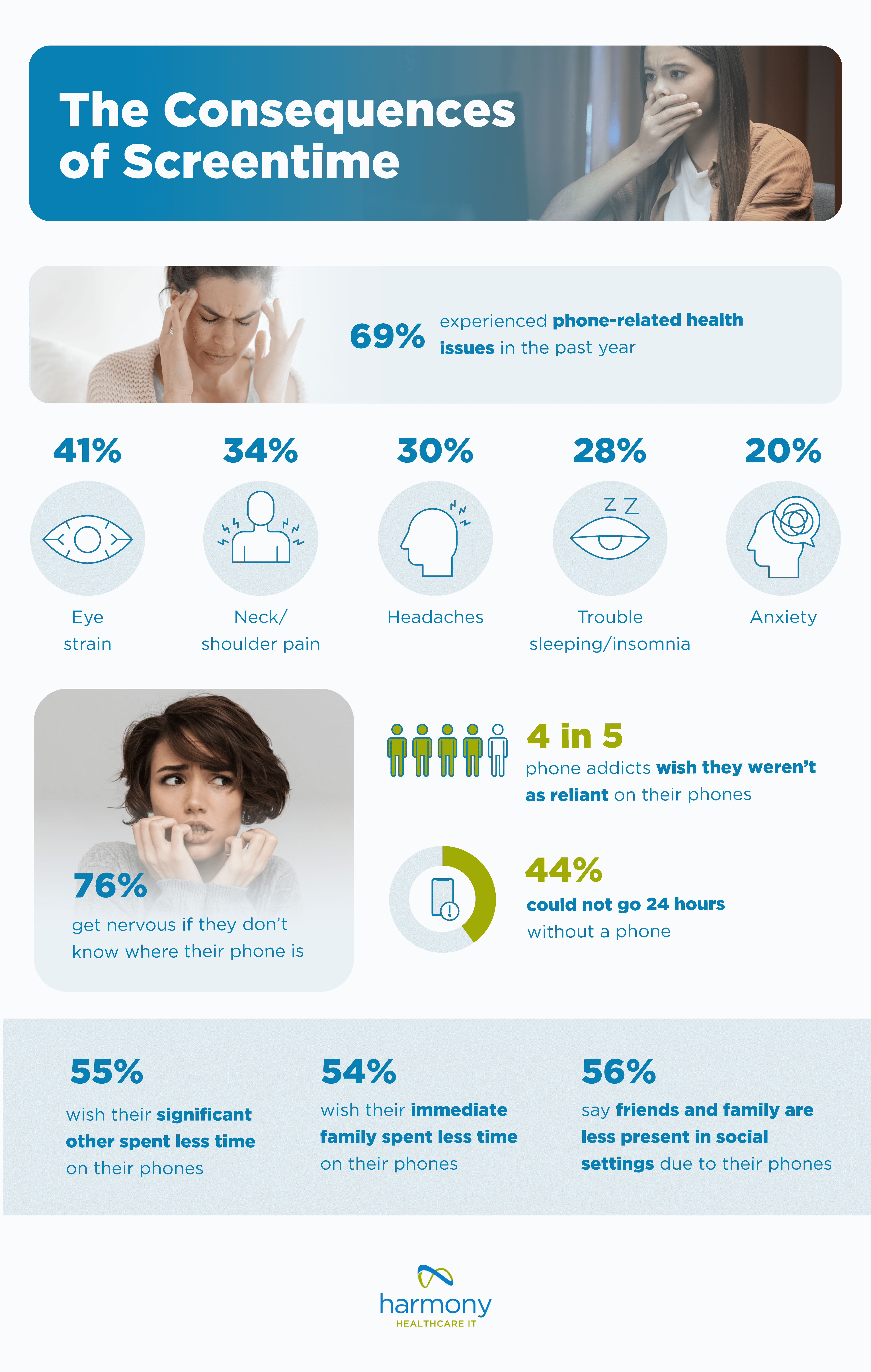
The Consequences of Screentime - report by www.harmonyhit.com

The top reason Americans want to cut back on their phone usage is because 2 in 3 want to make better use of their time and improve their time management. For others, it’s a matter of improving their health, both physically and mentally.

Health Issues

Whether you’re working on your computer or looking at your phone, hunching over and looking at screens for long periods is hard on the body. A study from the National Library of Medicine shows that prolonged use of smartphones could affect posture and respiratory function. Additionally, Mayo Clinic states that phone and computer time combined is bad for a person’s neck.

When asked about the impact of cell phone usage, over 2 in 3 (69%) have experienced a phone-related health issue in the past year. The most common maladies: eye strain, neck/shoulder pain, and headaches. Additionally, too much screen time has been shown to lead to sleep issues (28%) and anxiety (20%).

Unhealthy Attachment

Phone addictions can also prevent us from using our brains for simple tasks, navigating, and entertaining ourselves. The unhealthy attachment is something many wish they could do without. According to survey statistics, 3 in 4 (76%) get nervous if they don’t know where their phone is, and 44% could not go 24 hours without a phone. Of those who admit to having a cellphone addiction, data shows 4 in 5 wish they weren’t as reliant on their phones.

Social Impact

When it comes to social lives, 56% say friends and family are less present in social settings due to their phones. Additionally, 55% of people in a relationship wish their partner spent less time on their phones, and 54% wish their immediate family did the same.

The Impact of Phones on Our Daily Activities

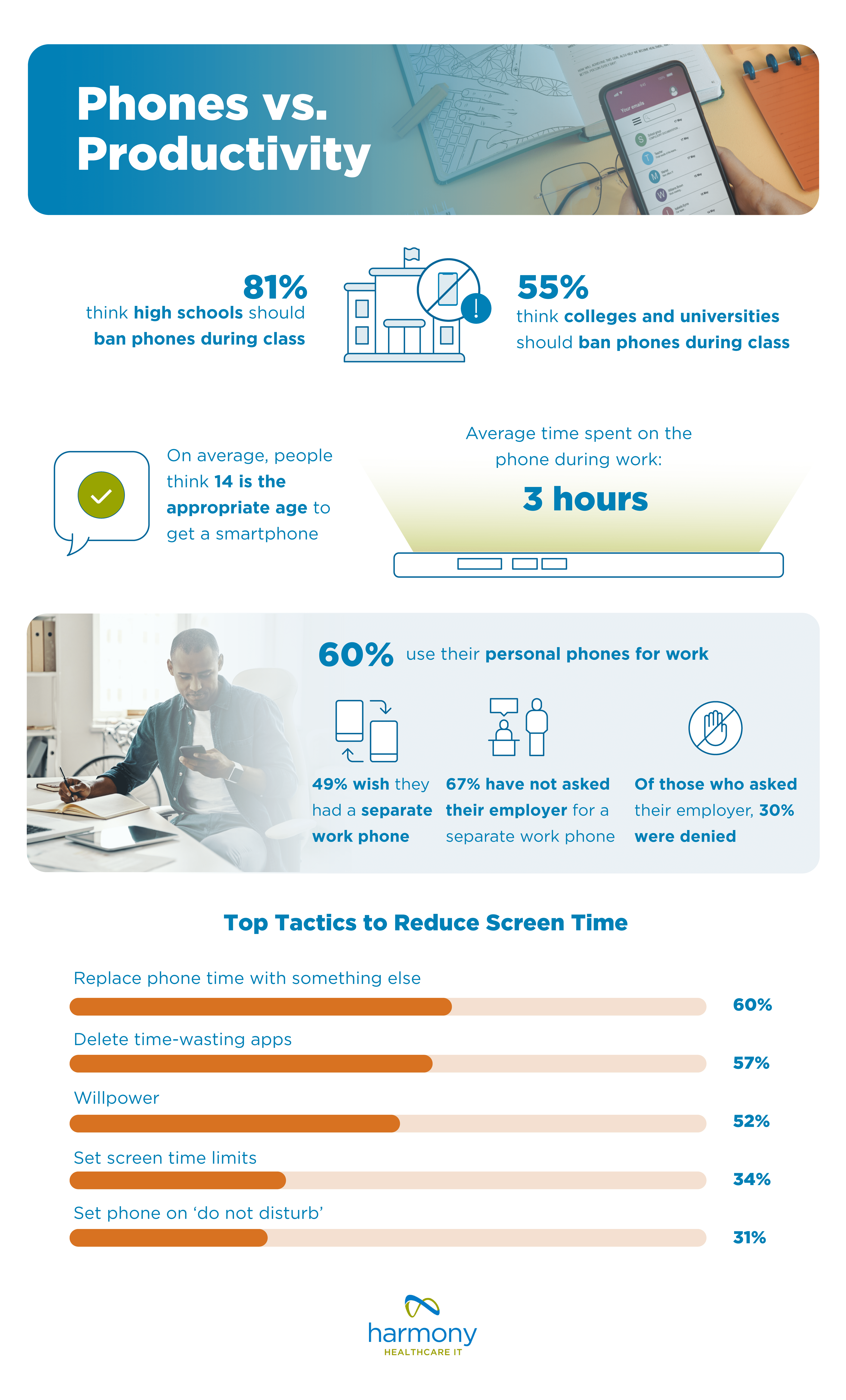
Phones vs. Productivity - report by www.harmonyhit.com

According to a small Stanford study, children are getting their first phone around the age of 12. Our survey found that people believe 14 years old is the appropriate age to get a smartphone, and 81% think high schools should ban phones during the school day. Over half (55%) think colleges and universities should also ban phones during class.

Phones have a way of making people less productive as they creep their way into classrooms and offices. While these devices were designed initially to communicate, people now spend more time scrolling on their phones rather than using them to talk with others. Only 11% of survey respondents shared they primarily use their phone for productive activities.

On average, people estimate spending 3 hours per day on their phones during work hours. This doesn’t mean that people are slacking off while on the clock, 60% report using their personal phones for work. Nearly half (49%) wish they had a dedicated work phone, but 30% of those who asked their employer were denied. Meanwhile, 67% haven’t asked their employer for a work phone.

Self-regulation can be a solution to getting off phones and being more productive. In fact, 60% of Americans who wish to cut back on phone usage plan to replace phone time with something else, 57% plan to delete time-wasting apps, and 52% plan to leverage their willpower.

At the end of the day, it’s up to you to keep track of how much time you spend on your phone. Try to schedule screen breaks throughout your day and go without your phone for an hour. Time spent not looking at your phone screen can help create more in-person experiences and foster stronger relationships in 2025 and beyond.

Methodology

In December 2024, we surveyed 1,001 people about their phone screen time habits. Survey respondents were asked to look up their average daily screen time logged on their phone and report it as part of the survey. Ages ranged from 18 to 78 with an average age of 43. 25% were Baby Boomers, 25% were Gen X, 25% were Millennials, and 25% were Gen Z. 47% were women, 51% were men, 1% were nonbinary, and less than 1% would rather not say.

_____________________________________________________________

2023 Report: America’s Screen Time

In our 2023 report, we broke down screen time by generation, examined lifetime cell phone usage, and explored the top causes of phone addiction.

2023 Phone Usage Statistics

  • 40% are trying to cut down on screen time in 2024
  • 36% don’t think they could go 24 hours without a phone in 2023
  • Screen time by generation in 2023:
    • Gen Z: 6 hours and 5 minutes
    • Millennials: 4 hours and 36 minutes
    • Gen X: 4 hours and 9 minutes
    • Baby Boomers: 3 hours and 31 minutes
  • Americans spent an average of 4 hours and 37 minutes on their phones in 2023

2023 Phone Addiction Statistics

  • 45% feel addicted to their phones in 2023
    • 56% Gen Z
    • 48% Millennials
    • 44% Gen X
    • 29% Baby Boomers
  • 52% think they are too dependent on their phone in 2023
  • Why Americans use their phone so much in 2023:
    • 70% Entertainment
    • 54% Boredom
    • 41% Distraction
    • 41% Habit
    • 38% Connection

Methodology

In December 2023, we surveyed 1,024 people about their phone screen time habits. Survey respondents were asked to look up their average daily screen time logged on their phone and report it as part of the survey. Ages ranged from 18 to 77 with an average age of 43. 25% were Baby Boomers, 25% were Gen X, 25% were Millennials, and 25% were Gen Z. 52% were women, 45% were men, 2% were nonbinary, and 1% would rather not say.

For media inquiries, please contact media@digitalthirdcoast.net.

Fair Use

When using this data and research, please attribute by linking to this study and citing www.www.harmonyhit.com.

Healthcare IT tips, guides, news & more delivered to your inbox

Learn More

Summary

How often legacy health data will need to be accessed in the future is the primary question to determine which long-term archive solution to use. This one question is key to formulating a data management strategy that best employs an active and/or inactive archive to preserve the data when a legacy application is decommissioned. In this blog, we look at the benefits and features of two kinds of active archives and an inactive archive. One important fact to remember is that a backup is NOT the same thing as an archive. Backups are a vital security measure, but different from an archive.

Join Fellow Healthcare IT Pros

Tips, Guides, News & More

Sign Me Up
The benefits of an active archive vs an inactive archive

The astronomical growth of health data and ever-evolving regulations about data accessibility and retention rules require a forward-thinking plan about how and where to save the information. The best long-term plan can require a mix of solutions to ensure the clinical, business, and financial data is secure, accessible, and useful for future patient care, operations, and medical research.

To best meet all the lifecycle data goals, there are two kinds of archives for consideration. An active and inactive archive both can contribute toward a solid long term data management strategy.

How can an active and inactive data archive support lifecycle data management?

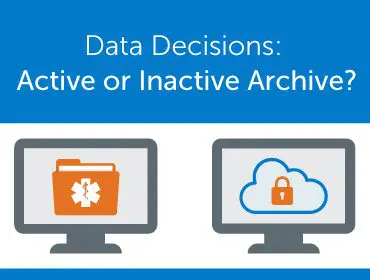
Let’s look at the two types of archives: active and inactive (also called cold storage). The reasons to use one or the other, or both, are straightforward. An active archive is best for legacy records that need to be readily accessible, while an inactive archive is for data files that may be needed on occasion (i.e., one or twice over several years) and there would be ample lead time to retrieve the records.

In a survey we conducted, 71 percent of CIOs reported their organizations have an archive in place. In that same survey, 94 percent also reported they have legacy applications up and running. This signals there is a lot of work ahead to streamline IT portfolios.

What are the differences and benefits of an Active and Inactive Archive?

Active Archive

An active archive is designed for users (clinicians, HIM, Legal, Revenue Cycle, Human Resources, etc.) to easily access active and static legacy data. The data may be accessed daily or frequently based on a variety of use cases.

Harmony Healthcare IT has designed two active archives with distinct features. Our vendor neutral archives accommodate data from any system in any format. This includes patient clinical and financial data, as well as facility financial and administrative data. Once the data is migrated from the legacy application to the vendor neutral active archive, the application and system can be decommissioned which offers cost savings, improved security, and options for interoperability.

Active Archive for clinical and business data – HealthData Archiver®

HealthData Archiver® provides HIPAA-compliant storage of clinical and business data of all types. The active archive has an easy-to-use interface that supports daily use by a variety of users.

A unique benefit of HealthData Archiver® is that it offers users ongoing Single Sign-On access from the active EHR. A new Legacy Record Indicator feature provides a visual cue within the go-forward EHR to signal that there are patient records linked in the archive.

The primary features of HealthData Archiver®

  • Clinical view – Users can view or share lab results and other clinical data to support informed treatment decisions.
  • Ability to add notes or comments about a stored record.
  • Release records in bulk or individually – to share for population health, APIs, HIEs, research teams and more.
  • Query and Search – across structured data to gather clear and concise results.
  • Compile info and assemble information to PDF.
  • Error correction – to upload addenda and link duplicate accounts through an HL7 merge.
  • Printing – Quick, custom and release of information.
  • DICOM Viewer – provides a complete cloud-based medical image archive that supports easy access for clinicians to view, download, rotate and flip study panels of images from radiology, cardiology, oncology, etc. This is an improvement from other archive solutions that only support static PDF images that limit the ability to see the whole patient story.

Active Archive for financial and billing records – HealthData AR Manager®

HealthData AR Manager® securely stores revenue cycle data for an active wind down. This includes simple transaction posting to automated collection agency management and complete collections functionality.

Key features of HealthData AR Manager®

The browser-based application supports the billing staff to continue managing more complex A/R wind down after the financial system is decommissioned. This includes:

  • Posting payments to outstanding accounts receivables
  • Receiving files from outsourced collection agencies to post against line items
  • Receiving/transmitting 835s and 837s and patient statement files
  • Producing statements and on-demand letters. Use word processing mail merge to create letter series.

HealthData AR Manager® can be used alone, or in conjunction with HealthData Archiver®.

Inactive Archive – HealthData Locker

There are cases where data needs to be stored, but frequent or immediate access is not needed. In this case, an inactive archive, sometimes called cold storage can be a viable choice for the unstructured, raw data. Data stored in an inactive archive is intended for occasional file access such as once or twice every 12-36 months. Future use cases for inactive data that would have lead time could include:

  • eDiscovery for legal or forensic analysis
  • Other data analysis

The benefits of inactive/deep storage support cost-effectiveness, security, scalability, and compliance.

HealthData Locker is a deep storage solution designed to support providers who need options to help prevent active archive overload with an option for their cold data that is no longer needed. There are two tiers of inactive storage offered that are based on access levels, frequency and format.

Our team can help with a long-term data management strategy to best utilize an active and inactive archive.

Based on whether the data stored within the legacy system is inactive or active and the type of legacy data source, HHIT will suggest whether HealthData Locker, HealthData Archiver®, or HealthData AR Manager® is best suited to protect and manage the records.

Are you evaluating your legacy systems and ready to further detail your lifecycle data management strategy.

Are you planning for the new Health Data, Technology and Interoperability (HTI-2) Rule?

We are ready to help work through your archive questions and get the right solutions in use for your organization.

Let’s Connect.

Healthcare IT tips, guides, news & more delivered to your inbox

Learn More