Summary

EHR vendors often leave out important information when discussing EHR with healthcare organizations. These details can cost you time, money and liability.

Join Fellow Healthcare IT Pros

Tips, Guides, News & More

Sign Me Up
EHR Nurse Ipad

Your healthcare organization has decided to replace its electronic health record (EHR or ERP).  From features and benefits to care template customization to meaningful use requirements, there is much to consider in a system replacement. The EHR project plan can become so overwhelming that you might find yourself leaning on the vendor for more guidance than expected. While that dependency can allow you to gain insight to some very valuable best practices, it might also expose a few “gotchas.”  Here are three dirty details that your new vendor may not mention during implementation planning.  We encourage you to investigate them early on as we consistently see them crop up as challenges for many of our clients replacing an EHR.

  1. Many EHR vendors expect customers to extract their own data from legacy systems.One of the first steps in EHR and/or ERP replacement is to determine what data is required, cost effective, or even possible to migrate to the go-forward solution. First, prioritize what clinical summary data is critical to provide quality care. Then, determine what data elements can and should be migrated. Last, determine who will extract the historical data from the legacy system. Will it be your own internal resources?  The new EHR or ERP vendor?  The legacy EHR or ERP vendor?  Legacy vendors — knowing they are going to lose a client — are often less than cooperative and have been known to charge the equivalent of “ransom” fees to provide extracts of your data from your legacy system. There are alternative EHR data conversion resources available to extract and migrate historical data in an affordable and timely fashion.  Plan ahead and budget for this expense.
  2. Some EHR vendors do not allow volumes of historical data into the new system. Clinical data can be complex when mapping it to a new EHR database schema. For that reason, some EHR vendors do not allow volumes of historical data to populate and “pollute” the new environment. Healthcare organizations that choose systems with this data migration restriction may not realize it until it’s too late.  As a result, they find themselves unable to convert the data they’d like to, or, spending extra time, money and effort on the conversion. There are some great options for storing historical data in a patient data archive that provides both accessibility for caregivers using the new EHR and compliance for HIM Directors meeting long-term medical record retention requirements. Ask your new vendor about any inbound data conversion restrictions before you buy.
  3. Most EHR vendors do not offer an archive solution to meet medical record retention requirements. A key consideration to think about during EHR and/or ERP replacement is the value of the data being retained from the legacy system. As planning and implementation takes place – surprisingly – the historical clinical, financial or administrative data is often an afterthought. EHR vendors are often so concerned about recognizing revenue by hitting milestones in the implementation of their own system that they neglect to counsel clients on the management of legacy patient data.  Review the legal and regulatory mandates for legacy data from a national, state, facility type and accreditation perspective. Compliance with HIPAA and numerous other regulations are must-have considerations that every healthcare organization is obligated to consider when replacing an EHR. Any solution for data archival should be easily accessible from across the go-forward system(s). This is not simply for immediate access to individual patient visit history, but for the wealth of value it provides for analytics across an historical patient population as well. Reporting on historical data is a topic often raised after an “aha” moment when it’s realized it can’t be done because legacy data may have been archived in PDF format only. Investigate options for discrete historical healthcare data storage.

Is there other information you wish your EHR vendor shared with you?  What tips do you have for other healthcare organizations replacing an EHR?

Editors Note: This blog contains some content from an earlier blog posted on April 7th, 2015.

Healthcare IT tips, guides, news & more delivered to your inbox

Learn More

Summary

Epic drops EHR data exchange fees until 2020, benefiting healthcare providers and patients with Harmon Healthcare IT’s HealthData Archiver®.

Join Fellow Healthcare IT Pros

Tips, Guides, News & More

Sign Me Up
Health Provider On Ipad

The recent announcement that health IT giant Epic will drop fees for electronic health record (EHR) data exchange until at least 2020 is good news for healthcare providers who are faced with managing access to a rapidly growing amount of new health and operational data while maintaining legacy data for years to come. This announcement also is good news for patients, who can only benefit from providers having better access to a more complete record of their health history.

The Office of the National Coordinator (ONC) reported to Congress that until now: “Developers charged fees that made it cost-prohibitive for most customers to send, receive or export electronic health information stored in EHRs, or to establish interfaces that enabled such information to be exchanged with other providers, persons, or entities.”

So what does this mean for the future of legacy healthcare data management?

Now, is the perfect time for healthcare providers to get all their “ducks in a row” by finding a solution that provides some level of access to relevant historical data that did not get converted into their go-forward system.

Harmony Healthcare IT’s HealthData Archiver®offers a cost effective solution to migrate numerous legacy data sources into a single, secure archive with ROI within 18 to 24 months. An option with that solution is to make CCD/CDA summaries of historical clinical data available to systems like Epic or Cerner.  CCD/CDA (Continuity of Care Document/Clinical Document Architecture) is a XML-based markup standard intended to specify the encoding, structure and semantics of clinical documents for exchange.

This CCD/CDA solution benefits healthcare providers by presenting a clinical summary at the time of service.  If more history than what is presented in the CCD/CDA summary is needed, quick and easy access to a complete archive of the patient’s data is also available.

Utilizing a single, consolidated archive environment makes sense, because it is:

  • HIPAA compliant
  • A virtualized solution that is easily deployed into an existing infrastructure, or can be remotely hosted
  • Open source architecture which keeps recurring costs down
  • Easy to access to view or print entire (or portions of) historical records
  • A single source for accessing historical source system data
  • A repository for both discrete data elements and scanned documents
  • A single vendor responsible for the extraction and archival of required data from disparate legacy systems

An electronic archive can be a positive solution on many fronts. Numerous systems can be migrated into one data archive that provides an easy method to search across decommissioned systems. The data is simple to access, and staff training is often less than 10 minutes for new and existing staff members. The ROI includes cost savings over time specifically in terms of maintenance, infrastructure and alleviating the additional personnel required to keep multiple systems alive.

Now is the time to take advantage of the “no fee data exchange” time window to migrate key clinical CCD/CDA summaries into your go-forward EHR and to store historical data away into an easy to use, effective archive. Waiting may become costly if IT giants like Epic change their minds and reinstate fees or other penalties.

Editors Note: This blog contains content from an earlier blog posted on May 6th, 2015.

Healthcare IT tips, guides, news & more delivered to your inbox

Learn More

Summary

Where in the world might you find our team members when they’re away from the office?  Practically anywhere — a mountain top, the ocean floor, the heart of New York City, the islands of Japan . . . even Cinderella’s Castle.  At Harmony Healthcare IT, we work hard and we play hard.  We call that...

Join Fellow Healthcare IT Pros

Tips, Guides, News & More

Sign Me Up
#InHarmony Underwater

Where in the world might you find our team members when they’re away from the office?  Practically anywhere — a mountain top, the ocean floor, the heart of New York City, the islands of Japan . . . even Cinderella’s Castle.  At Harmony Healthcare IT, we work hard and we play hard.  We call that being #InHarmony.

We’re sharing snapshots of our traveling logo to show that each person on our team is more than their contribution at work.  Each person has a story and work is simply one part of their fuller life.

We encourage work-life balance.

We admire the spirit of adventure.

We applaud the achievement of goals.


So, in the spirit of being #InHarmony, we will consolidate and archive photos of our team members — celebrating their zest for living in places all over the planet, or even right here in our home town.  We’ll do this so our followers can access a more complete narrative of our team. We’re pretty comfortable with this assignment as we focus every day on helping healthcare providers migrate and consolidate disparate legacy health records into a secure archive solution, HealthData® Archiver.  Making a more complete patient narrative accessible to physicians when decisions are made at the point of care is important – oftentimes even critical.

We take a lot of pride in preserving snapshots in time.

We look forward — several months or years from now – to looking back and appreciating where our team has been.  It’s fair to say we’re partial to both looking forward and looking back.

If you have a lot to offer and want to be #InHarmony, check out our careers page.

Healthcare IT tips, guides, news & more delivered to your inbox

Learn More

Summary

The U.S. Department of Health and Human Services hosts a website where it lists the more than 2500 EHR systems and vendors who are linked to decertified products, products that are marked for corrective action and those products with inactive certificates. Users can search to see if their EHRs or vendors are on the list...

Join Fellow Healthcare IT Pros

Tips, Guides, News & More

Sign Me Up
Correct and Incorrect Inactive

The U.S. Department of Health and Human Services hosts a website where it lists the more than 2500 EHR systems and vendors who are linked to decertified products, products that are marked for corrective action and those products with inactive certificates. Users can search to see if their EHRs or vendors are on the list for these and other infractions, including banned developers.

To visit the website, go to: https://chpl.healthit.gov/#/search 

This website points to the increasing challenges within the EHR landscape. In general, the future of electronic health records is a bit blurry as healthcare providers work toward meeting the increased HIPAA requirements while chasing the goal of interoperability. Plus, there is the challenge of managing the sheer number of EHR systems within their portfolios. According to HIMSS, the average health system has 18 different EMR vendors when looking all the way across affiliated providers.

One thing that is clear is that not all current EHR systems will survive the increased HIPAA requirements for Meaningful Use, or have the financial stability to meet the technology expectations of healthcare providers who are continually challenged to have instantaneous access to the complete patient narrative at the point of care.

In its recent EMR 2018 Report: The Market for Electronic Medical Records, research company Kalorama Information noted: “Install it and forget it’ vendors need not apply.” Healthcare organizations once sought the most basic EHR. Now, however, providers are demanding vendors both develop and deploy the software as well as maintain and update it with tools to solve healthcare organizations’ various business problems.

Should any combination of your EMR products be acquired or sunset over time, data archiving is always an alternative to the more costly and complex EMR data conversion.  A well-planned legacy data management strategy alleviates future IT costs, risks and burdens as platforms come and go. Long-term medical data storage vendors who know the EMR market inside and out offer secure solutions that ensure data integrity and meet HIPAA and state medical record retention requirements.

When you look at the real cost of maintaining multiple legacy systems, including licensing, maintenance and support as well as the associated internal IT labor burden, the ongoing management of outdated systems becomes difficult to justify. Plus, the risk exists that the old systems may become obsolete and non-supported. Keeping the organization’s long term vision in mind, there is business value and strategic benefits to adopting an EMR archive to keep legacy data intact in a searchable, manageable and HIPAA-compliant format.

Is it time to shore up disparate data silos in your organization?  We can help.

Healthcare IT tips, guides, news & more delivered to your inbox

Learn More

Summary

At our company, we love a little bit of friendly competition. A recent cornhole tournament united 18 employee teams into two conferences; Health vs. Data.  A few rounds of seeding games to determine rank soon led to an official set of single elimination brackets.  The final game brought a lot of cheers, jeers, and even a...

Join Fellow Healthcare IT Pros

Tips, Guides, News & More

Sign Me Up
Cornhole Competition

At our company, we love a little bit of friendly competition.

A recent cornhole tournament united 18 employee teams into two conferences; Health vs. Data.  A few rounds of seeding games to determine rank soon led to an official set of single elimination brackets.  The final game brought a lot of cheers, jeers, and even a company cookout.

Congratulations to the winning team of Michael and Tai (dubbed “Almost A Team”), who ultimately defeated Jacob and Tom D (the “Candy Corners”). As a result of the victory, Michael and Tai took trophies to their desks and laid full claim to bragging rights — at least until the next cornhole showdown.

“It was a lot of fun planning and also playing,” explains Jacob Carson.  Jacob volunteered to chair the event as a part of the second quarter social committee at Harmony Healthcare IT. “I enjoyed seeing people embrace it, come up with creative team names and talk about  upcoming games.  I absolutely set the tournament up with the goal of it becoming a reoccurring event.”  And, it’s highly likely that it will.

While our teams may be a long way from competing on a professional level (Michael and Tai may beg to differ!), it is interesting to note the gaining popularity of the sport of cornhole. In case you didn’t know there was such a site, visit the official website of the American Cornhole Organization: https://americancornhole.com

If you’ve got mad cornhole skills — as well as other professional attributes for which we’re currently hiring — be sure to check our health IT careers page and (ahem) toss us your resume.

Healthcare IT tips, guides, news & more delivered to your inbox

Learn More

Summary

At Harmony Healthcare IT, our data experts help healthcare delivery organizations develop legacy data management strategies to reduce risk and cost.

Join Fellow Healthcare IT Pros

Tips, Guides, News & More

Sign Me Up

Creating a Legacy Data Management Strategy
Thinking about how to manage legacy data for your healthcare organization can seem daunting, especially when many larger enterprises may have data from 30+ out-of-production systems to consider. IT Directors often tell us they know their old systems are costly to maintain and carry other risk factors, yet, they don’t take action.  With other pressing tasks at hand, legacy data management just never seems to take a front-seat priority.

  • What if there was a starting point?
  • What if there was a process to guide you through the necessary steps to take action?

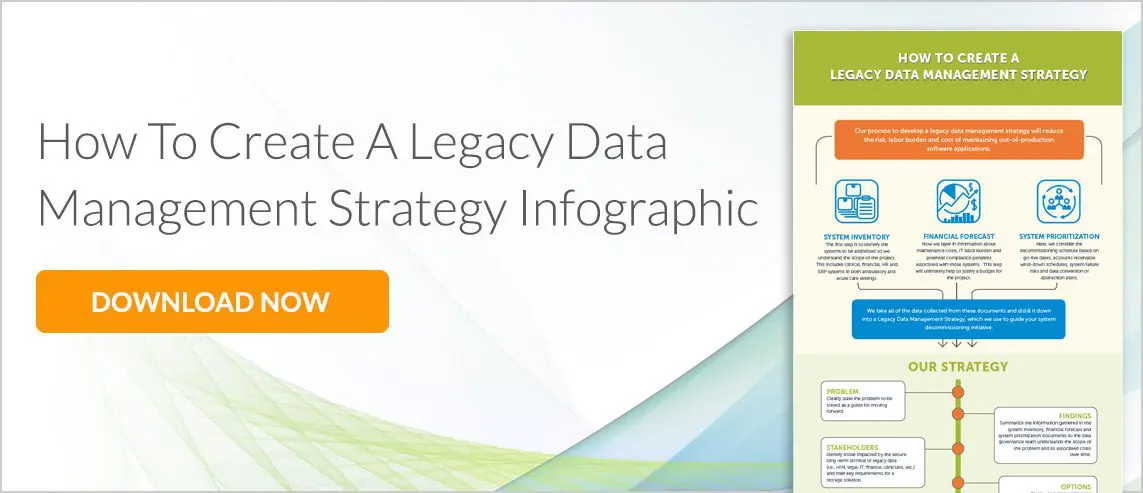
The data experts at Harmony Healthcare IT have put together a process that has helped hundreds of ambulatory and acute care organizations evaluate their legacy clinical, financial, HR and ERP system portfolio to create a Health Data Life Cycle Management Strategy that works. The process guides providers through a system inventory, financial forecast and system prioritization for decommissioning legacy systems enterprise-wide. It provides details to outline a five point strategy that is customized for each organization and rounded out with a commitment for collaborative execution. Perhaps the best part of the strategy is that it identifies significant areas to mitigate risks and provide cost savings.

Are you searching for a starting point to shore up your legacy systems and related data? Look no further.  Review or download the infographic and then  contact the data experts at Harmony Healthcare IT today to get started.

Editor’s Note: This blog was updated from a prior version published October 13th, 2016

Healthcare IT tips, guides, news & more delivered to your inbox

Learn More

Summary

Whether a healthcare facility stores patient records in perpetuity or follows a strict retention guideline that involves destruction of records, technology can be applied to support retention and/or purge policies.

Join Fellow Healthcare IT Pros

Tips, Guides, News & More

Sign Me Up
Deleting Erasing Data

Conversations with medical record, legal, and human resources teams about purging electronic patient or employee records are becoming more frequent at Harmony Healthcare IT.  Some healthcare facilities choose to keep every patient record in perpetuity, requiring a secure storage solution with workflows for health information management professionals, clinicians, compliance officers and/or human resource representatives.  Other facilities follow a strict record retention policy that includes destruction of records at designated times based on specific criteria.  The archiving specialists at Harmony Healthcare IT routinely consult with both types of healthcare organizations about how technology can be applied to their record retention and/or purging policies.  The features of HealthData Archiver®, Harmony Healthcare IT’s long-term record storage solution, are continually being updated to support the numerous requirements for clinical and employee data life-cycle management.

A few industry-leading purge features that we’ve built into HealthData Archiver®, include:

Purge Rules

Designed to accept a multitude of if-then scenarios based on record retention policy, HealthData Archiver® is flexible in how it creates, manages and allows for exceptions with purge rules. Criterion for record destruction might include date of last service, date of discharge, date of birth, document or data type (i.e., behavioral health), etc.  Exceptions may include legal hold, RAC audit, clinical research or other similar situations which might prevent a medical record from being destroyed.

Automatic or Manual Purge

Purging can be configured as an automatic or manual process.  If automatic, the system will follow the purge rules created, identify the records which meet destruction criteria, and then queue the records for purge at a scheduled time.  This automatic process happens without user intervention.  Manual purging allows the user to dictate when the process will take place and which rules it will follow at that time.

Proof of Purge

Certificates of destruction are provided to show that a record was available at one point.  The certificate includes the reason as well as the date and time of the purge event (i.e., the record reached the ten year retention period on 12/31/16 at 10:00amET).

Purge Delay and Un-Purging

Upon processing of a purge routine, a soft purge occurs.  This means that the records are no longer visible in the archive, however, they are available to be un-purged for a user-defined period of time (i.e., the purge delay).  Once the purge delay time has expired, the record is hard purged.  A hard purge means that the records have been deleted from the archive per National Institute of Standards and Technology (NIST) guidelines.

Is your healthcare organization planning to decommission legacy EMR or ERP applications?  If so, the patient and employee data should be extracted, migrated and secured in an archive with features that match your record retention and destruction policies.  Learn more about Health Data Archiver’s purging and many other features by scheduling a demonstration with one of our archiving specialists.

Editor’s Note: This blog was updated from a previous version that was posted on February 1, 2017.

Healthcare IT tips, guides, news & more delivered to your inbox

Learn More

Summary

According to industry analysis, the amount of data in your healthcare system is multiplying 100% every 18 months or so. As yet another New Year approaches, it makes sense to ask "what is my long-term plan to retain and manage this vast amount of data". The New Year is the perfect time to clean house, decommissioning out-of-production applications and consolidating data stores.

Join Fellow Healthcare IT Pros

Tips, Guides, News & More

Sign Me Up
Deleting Data

According to industry analysis, the amount of data in your healthcare system is multiplying 100% every 18 months or so. This rapid increase of data lends the question, what is my long-term plan to retain and manage this vast amount of data? If you’ve recently invested in a new EMR, LIS, ERP or any other departmental system, you’re likely storing patient or employee data in multiple sources on various aged servers. It is time to clean house, decommission out-of-production applications and consolidate data stores. Think of it as shedding the weight that is bogging down your IT labor burden, cost and risk not to mention compromising e-discovery efforts and costs. Record retention rules mandate keeping data for seven to 25+ years. Lighten the load of how you’re storing data long-term. Make it easier to find when responding to inquiries from patients, payers, employers or lawyers.

Here is a high-level five-step plan to get you started:

1. Prioritize Legacy System Requirements Take a look at all of the legacy systems in play which – for a sizeable health system — could be upwards of 30 to 40 applications. Determine and prioritize what needs to happen with each one. If you haven’t already created a spreadsheet that includes every system, do it now. It may be time to decommission outdated, legacy systems that will likely have costly technical issues if you try to maintain them for the next 25 years or even the next three years! Take a look at contract renewal dates and evaluate costs and staffing needs to maintain these systems in years to come.

2. Determine Legacy Data Management Strategy Three words: abstract, migrate and archive. Now is the time to dive in and determine what and how much to bring into the go-forward system. Create a plan and migrate essential data to the new system. Then, determine what data can be archived and stored securely with searchable functions. This task can be daunting, but, it is vital to the long-term health of your IT operations. Our consultants who specialize in developing legacy data management plans can help guide the way with a variety of options.

3. Select a Legacy System Decommissioning Partner You do not have to go it alone. There are reputable vendors who have expertise in legacy system decommissioning, EMR data migration and legacy patient data archiving. Look for the vendor with an entirely turnkey data extraction, migration and retention operation. This is the vendor that will offer the most comprehensive and seamless transition as well as provide ongoing support and technical resources for your team long-term.

4. Get ‘Er Done Taking action to shore up your legacy data retention strategy is work, but is critical to the success of your EHR program. The work is in establishing a cross-functional data governance team, setting up the data management rules to coincide with your medical record retention plan and testing and validating the data migration. Work with an archiving vendor that can help you easily build out a project plan. Legacy data is part of your overall EHR program and should be treated as important.

5. Evaluate the Outcome Once you’ve decommissioned some of your systems and archived the patient data, stop to evaluate lessons learned. What went right? What went wrong? Are legacy data silos being successfully consolidated? Have legacy system maintenance costs gone down? Is the legacy patient data easily discoverable and accessible across your user base? Review your inventory spreadsheet and ensure you’re on track to keep reaping the benefits of archiving health data.

System decommissioning and legacy data archival: this is a task that will have cost and work-flow benefits that will extend for many years to come. Think of how much better you will feel at this time next year knowing that the heavy lifting is done.

Why leave a legacy in your IT department and at your hospital or medical practice when you simply don’t have to?

Editor’s Note: This blog contains content from an earlier blog posted on December 15th,2015.

Healthcare IT tips, guides, news & more delivered to your inbox

Learn More

Summary

To remain HIPAA compliant, every physical medical record must be stored, accessed, and moved throughout its life cycle in compliance with specific privacy regulations. It is important for your healthcare organization to have a plan to maintain accurate chain of custody of your electronic health records. Your healthcare IT team can ensure the historical electronic medical records in your care are secure and compliant with chain of custody.

Join Fellow Healthcare IT Pros

Tips, Guides, News & More

Sign Me Up
Securing Medical Records

While there may be some differentiation state to state about who ultimately “owns” a medical record, the one constant nationwide is that to remain HIPAA compliant, every physical medical record must be stored, accessed, and moved throughout its life cycle in compliance with specific privacy regulations. These rules were significantly tightened under the American Recovery and Reinvestment Act of 2009 (ARRA) and include provisions that every hospital, practice and third-party provider must be compliant with all current HIPAA regulations. (Source)

Keeping track of every record throughout its life cycle and ensuring its protection can be a formidable challenge. Plus, the government has amplified its enforcement and penalties related to protected health information (PHI) of up to $1.5 million annually per type of violation.

So, how can your healthcare IT team ensure the electronic medical records in your care are secure and compliant? Let’s take a look at Chain of Custody (COC).

What defines custody of a document?

In general, custody refers to when a person has physical possession of a document or has visual sight of the document.

Similarly, Chain of Custody refers to how any time someone touches, looks at or stores a document, the company must keep a record of the activity. The Chain of Custody can be stored in a system that keeps track of a document’s location and who has accessed it.

It is important for your healthcare organization to have a plan to maintain accurate Chain of Custody of your electronic health records. The plan should include details about:

  • Security – Who has access to each type of electronic health record (from PHI to HR data to other operational records)
  • Storage & Retrieval – How the documents are accessed and stored. One long-term secure storage option is an archive, such as Harmony Healthcare IT’s HealthData Archiver®. This solution should offer the ability to audit the chain of custody. Benefits include easily seeing who has accessed the record via audit logs in the archive and ensuring the ability to migrate the COC from the source application if it exists.
  • Custody Log – A process to identify each time a record is stored or received. This includes a log that notes who accessed the document, where/when it was accessed and a description of the document being accessed.

Avoiding a Chain of Custody Failure

If the unfortunate happens and there is a problem with your electronic document management, your organization could suffer the loss of documents up to a large scale security breach. Besides the obvious reputation issues, security breaches are expensive. The two largest recent security breaches with Community Health System and Anthem cost upwards of $100 million. Legally, breached entities face potential class-action lawsuits and multi-year compliance plans. Additionally, consumer trust, the bedrock for provider and payer relationships with patients, evaporates. (Source)

One of the main problems we see with healthcare organizations is that storing legacy data in multiple places causes more problems than it solves. As many healthcare organizations strive for one common go-forward EHR or ERP system, they should also strive for one common archive. Preserving medical or employee records in a single location makes for simplified eDiscovery, access, request for information fulfillment and reporting. It is not uncommon for healthcare organizations to have upwards of 30 disparate legacy systems up and running at one time. It’s a good idea to consult with trusted industry experts to help you properly and safely prioritize and project manage the decommissioning of legacy systems. Minimizing the number of locations that data exists can also potentially help minimize the risk of security breaches.

Don’t do it alone. Time and resources both are limited. With the strict and ever-evolving HIPAA compliance regulations and the massive volume of EHR’s on your watch, contact a trusted record retention expert to help outline and implement a solid plan for data storage and retrieval.

Bottom line: Keep the Chain of Custody secure.

For more information about tracking chain of custody for your historical medical records, contact Harmony Healthcare IT, the makers of HealthData Archiver®.

Editor’s Note: This blog contains content from an earlier blog posted on May 17th, 2016.

Healthcare IT tips, guides, news & more delivered to your inbox

Learn More

Summary

As it pertains to medical record storage, HIPAA regulations are specific, and, there are hefty fines if the protocols for Chain of Custody are not followed. One of the main problems we see with healthcare organizations is that storing legacy data in multiple places causes more problems than it solves. As a healthcare organization strives for one common go-forward electronic health record (EHR) or enterprise resource planning (ERP) system, it should also strive for one common archive. A robust archive provides a secure, long-term home for EHRs, ERPs and data from other important systems. An archive also provides for HIPAA compliant Chain of Custody protocols for decades to come.

Join Fellow Healthcare IT Pros

Tips, Guides, News & More

Sign Me Up
Computer Security

In an earlier blog we shared some tips on how to secure the Chain of Custody in your medical records.  Today, we’ll take a look at additional safeguards to ensure that protected health information and images are safeguarded for the life cycle of the data.

As a reminder, the term “chain of custody” typically refers to when a person has physical possession of a document or has visual sight of the document. Similarly, Chain of Custody refers to how a company must keep track of a document’s location and who has accessed it.  This includes anytime a person touches, looks at or stores a document.  For our purposes, a document can also mean data that is stored as a part of an electronic medical record.

The term “data lineage” refers to the life cycle that includes the data’s origin and where it moves over time. This term can also describe what happens to data as it goes through diverse processes. Data lineage can help with efforts to analyze how information is used and to track key bits of information that serve a particular purpose.

As it pertains to medical record storage, HIPAA regulations are specific, and, there are hefty fines if the protocols for Chain of Custody are not followed. One of the main problems we see with healthcare organizations is that storing legacy data in multiple places causes more problems than it solves. As a healthcare organization strives for one common go-forward electronic health record (EHR) or enterprise resource planning (ERP) system, it should also strive for one common archive.  A robust archive provides a secure, long-term home for EHRs, ERPs and data from other important systems.  An archive also provides for HIPAA compliant Chain of Custody protocols for decades to come.

There are many considerations in EHR data management that carry through to the archival of protected health information.  At Harmony Healthcare IT, the makers of HealthData Archiver®, we pay particularly close attention to the following:

Safety and Security in the ETL Process – As a leading archive vendor in the healthcare market, we own the ETL (extract, transform, load) process to ensure whenever we migrate data from originating source(s) to HealthData Archiver®, we do it with the most secure methodology. We track and protect data lineage during the archiving process.

Addressing Business Requirements and Uncovering EHR Issues – Throughout the archiving process, we adhere to our clients’ business requirements and data governance rules.  For instance, if a client doesn’t want the records of patients who have been marked as deceased for greater than one year archived, we note the requirements and run all data against the business rules. Sometimes the archiving process also uncovers damaged or corrupted source data and we are able to alert our clients to unknown issues within their source systems. These issues sometimes exist when software support has lapsed and there can be remedies with back up files if the issues are found soon enough.

User-based Audit Logs – Chain of Custody within an archiving solution like HealthData Archiver® should be documented and be readily reportable via audit log reports. This is standard for HealthData Archiver® and helpful for healthcare organizations as it puts them in excellent position in terms of meeting HIPAA and e-Discovery requirements.  Additionally, this is important when a hospital needs to produce documentation during litigation or when it’s time to purge records.

Error Correction FeatureHealthData Archiver® includes both strike thru, notes and addenda features.  These features show how data was displayed in the source system and, subsequently, when it was changed or corrected in the archive. This could be helpful when, say, there is an allergic reaction to a medication after the original record already exists in the archive, if a result was erroneously recorded in the source system, or a document wasn’t scanned and should be part of the original legal record.

Privacy MonitoringHealthData Archiver® integrates well with third-party privacy monitoring software like FairWarning®. This is helpful as some organizations review a security/compliance dashboard which receives audit log feeds from various software versus requiring multiple logs/reports to be reviewed.  HealthData Archiver® offers this capability so that privacy and security may be monitored in the greater context of the enterprise and its various systems.

Health data is growing exponentially. As many healthcare organizations strive for one common go-forward EHR or ERP system, they should also strive for one common archive.

Contact Harmony Healthcare IT, the makers of HealthData Archiver®, today to ensure the chain of custody and data lineage around your protected health information is secure.

FairWarning® is a registered trademark of FairWarning, Inc.

Editor’s Note: This blog contains content from an earlier blog post from November 29th, 2016.

Healthcare IT tips, guides, news & more delivered to your inbox

Learn More